

Sermon Repository (for Admin)
IMPORTANT: The "Enable Page" toggle in the page settings must always remain OFF.
This page serves exclusively as a backend file hosting repository for the Sermon Archive. Its purpose is to provide a place to upload files (images, audio, video, and documents) so they can be hosted directly on Squarespace.
Workflow Instructions:
Upload your files to this page to generate a Squarespace-hosted link.
Copy the generated link(s).
Paste the link into the corresponding column in the Sermon Archive Google Sheet. (The Google Sheet automatically pulls these links to render the sermons on the live, public-facing Sermon Archive page).
Sermon Asset Definitions:
Sermon Graphic/Image: The main artwork for the sermon, typically provided by the Creative Director.
Sermon Video/Audio: The media files for the sermon recording.
Sermon Transcript: Must be a PDF. The typed transcript of the message.
Sermon Manuscript: Must be a PDF. The speaker's original manuscript (if provided).
Sermon Notes: Must be a PDF. These are the notes and discussion questions that are developed for Lighthouses using Gloo Content Studio. For instructions on how to generate these notes, follow this link.
-
We organize our file uploads by Sermon Series using separate Text Blocks. The newest, active series should always be at the top of the page (just under this accordion).
Starting a New Series: Click the + Add Block button on the page and select Text. Type the name of the new series in bold at the top of the block, then copy/paste the template from Step 4 into it.
Archiving an Old Series: When a series ends, simply click and drag its Text Block further down the page so the newest series remains at the very top.
-
When creating links, the text of the link MUST be formatted using the following standard format so we can easily identify them: YYYY-MM-DD_SermonTitle_AssetType
(Note: It does not technically matter what the actual file is named on your computer, as long as the link text on this page matches the format below. However, updating the nomenclature in your computer files before uploading the file to Squarespace is really good practice and will limit future confusion).
Examples:
2026-08-30_TheGoodNews_Image
2026-08-30_TheGoodNews_Media
2026-08-30_TheGoodNews_Transcript
2026-08-30_TheGoodNews_Manuscript
2026-08-30_TheGoodNews_Notes
Copy and paste the block below for each new sermon. Update the Date and Title, then highlight the text to create your file links.
[YYYY-MM-DD] - [Sermon Title] [Series Title] [Speaker Name]
YYYY-MM-DD_SermonTitle_Image
YYYY-MM-DD_SermonTitle_Media
YYYY-MM-DD_SermonTitle_Transcript
YYYY-MM-DD_SermonTitle_Manuscript
YYYY-MM-DD_SermonTitle_Notes
-
After copying/pasting the template in the appropriate sermon series block down below, update the date and title, then highlight the full text of the asset you want to upload (e.g., 2026-08-30_TheGoodNews_Image).
Click the Link icon in the text toolbar.
Click the Gear icon > File tab > Upload File (or select an existing one). It is very important that these files are .PDF
Save the link settings to apply it to the text.
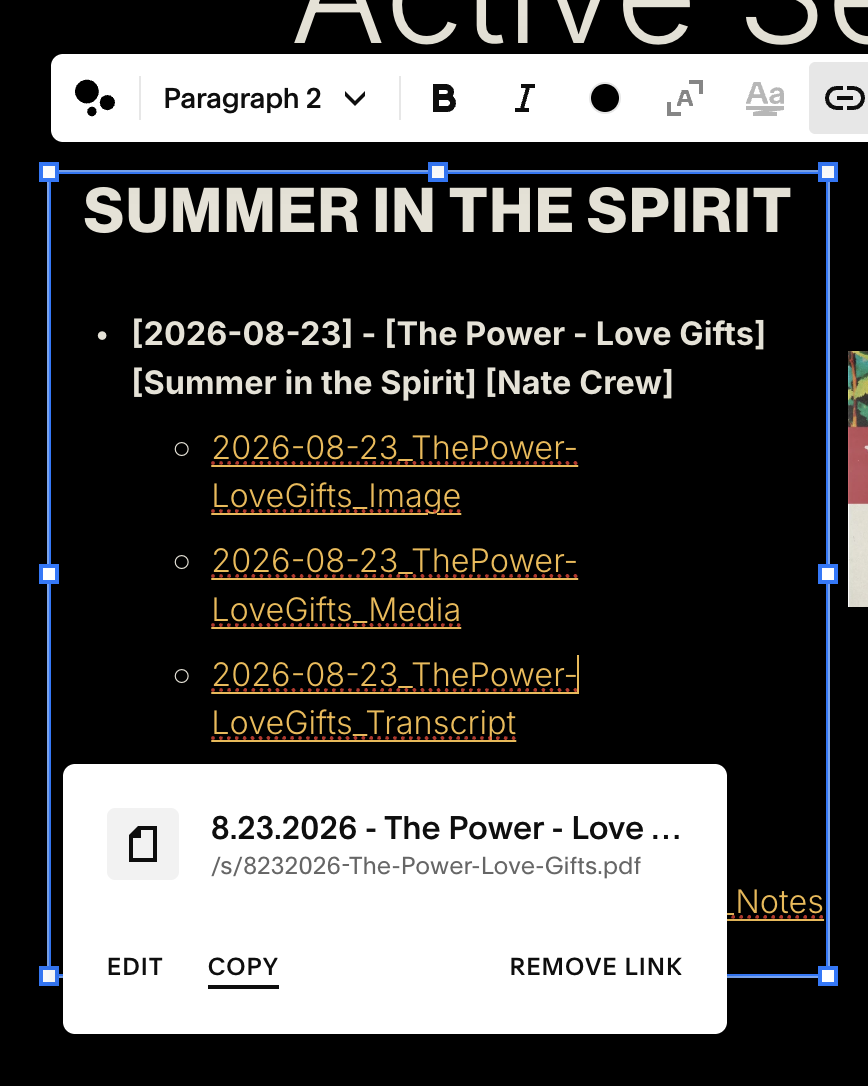
CRITICAL:While still in Edit Mode, click the newly created link in the text block and copy the URL. (Do NOT copy the link from the preview/live/or saved page. You need the direct file link that looks like www.wearecitylight.org/s/[filename]. If the link you copied has “armadillo” in it, it’s the wrong link and will not work). Please see the images to the right to see what this process should look like.
Paste the copied link into the Sermon Archive Google Sheet, then Save the page.
Copy the URLs from within Edit mode, not in preview or live.
Active Sermon Series
Are Your For Real? (1 John)
[2026-09-27] - [Black & White] [Are You For Real?]
2026-09-27_Black&White_Nate_Media
2026-09-27_Black&White_John_Media
[2026-10-4] - [Walk the Talk] [Are You For Real?]
2026-10-4_Walk the Talk_Luis_Media
2026-10-4_Walk the Talk_Luis_Manuscript
2026-10-4_Walk the Talk_Dale_Image
2026-10-4_Walk the Talk_Dale_Media
2026-10-4_Walk the Talk_Dale_Manuscript
[2026-10-11] - [What Do You Love?] [Are You For Real?]
2026-10-11_What Do You Love?_John_Media
2026-10-11_What Do You Love?_Nate_Media
[2026-10-18] - [Don’t Be Deceived] [Are You For Real?]
2026-10-18_Don’t Be Deceived_Nate_Media
2026-10-18_Don’t Be Deceived_Dale_Image
2026-10-18_Don’t Be Deceived_Dale_Media
2026-10-18_Don’t Be Deceived_Dale_Notes
Ruth: From Bitter to Better
(Young Adults)
[2026-09-22] - [Bitter to Better] [From Bitter to Better] [John Arevalo]
2026-09-22_Bitter to Better_Manuscript
[2026-10-6] - [Finding Favor] [From Bitter to Better] [Bruce Jones Jr.]
2026-09-22_Bitter to Better_Media
2026-09-22_Bitter to Better_Manuscript
2026-09-22_Bitter to Better_Notes
Active Sermon Series
SUMMER IN THE SPIRIT
[2026-08-23] - [The Power - Love Gifts] [Summer in the Spirit] [Nate Crew]
2026-08-23_ThePower-LoveGifts_Image
2026-08-23_ThePower-LoveGifts_Media
2026-08-23_ThePower-LoveGifts_Transcript
2026-08-23_ThePower-LoveGifts_Manuscript
2026-08-23_ThePower-LoveGifts_Notes
[2026-08-30] - [The Power - Word Gifts] [Summer in the Spirit] [Nate Crew]
2026-08-30_ThePower-WordGifts_Image
2026-08-30_ThePower-WordGifts_Media
2026-08-30_ThePower-WordGifts_Transcript
2026-08-30_ThePower-WordGifts_Manuscript
2026-08-30_ThePower-WordGifts_Notes
[2026-09-6] - [The Power - Power Gifts] [Summer in the Spirit] [Nate Crew]
2026-09-06_ThePower-PowerGifts_Image
2026-09-06_ThePower-PowerGifts_Media
2026-09-06_ThePower-PowerGifts_Transcript
2026-09-06_ThePower-PowerGifts_Manuscript
2026-09-06_ThePower-PowerGifts_Notes
Good Company
(Young Adults)
[2026-09-01] - [Feel the Friction] [Good Company] [Bruce Jones Jr.]
2026-09-01_Feel the Friction_Image
2026-09-01_Feel the Friction_Media
2026-09-01_Feel the Friction_Transcript
2026-09-01_Feel the Friction_Manuscript
More than Conquerors
(Young Adults)
[2026-10-2] - [When God is For You] [More than Conquerors] [Bruce Jones Jr.]
2026-10-2_When God is For You_Image
2026-10-2_When God is For You_Media
2026-10-2_When God is For You_Transcript
2026-10-2_When God is For You_Manuscript
2026-10-2_When God is For You_Notes
2026-10-3_More than Conquerors_Image
2026-10-3_More than Conquerors_Media
2026-10-3_More than Conquerors_Transcript
2026-10-4_How Can They Preach_Image
2026-10-4_How Can They Preach_Media